

<
How to configure the AMP plugin for WordPress?
Neerav Mehta
Founder & CEO
AMP stands for accelerated mobile pages. AMP is a standard put forth by Google. AMP pages are cached by Google on its servers and are very fast to load. Whenever a user searches on Google using mobile, Google shows the AMP page instead of the main WordPress page. Since the AMP pages load very fast, user experience is significantly better and Google favors these pages over normal pages.
Follow these easy steps to set up AMP on your WordPress site quickly:
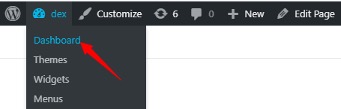
- Open the dashboard from the top left on your website.
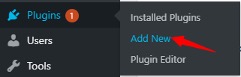
- Navigate to the left side, scroll down and hover your cursor above Plugins, and click on Add New.
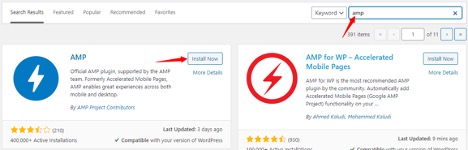
- On the top right, search for "AMP" and press Enter. The first result will be the "AMP for WP - Accelerated Mobile Pages" plugin. Click on Install Now.
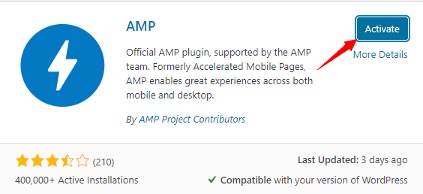
- After installation, you will see an Activate button. Click on Activate to proceed further.
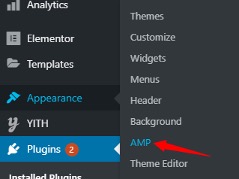
- Now hover your cursor above Appearance and click on AMP.
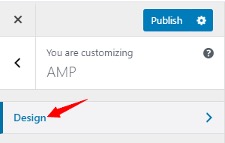
- You will be redirected to the AMP customizer page. From there, click on the Design tab to open other settings.
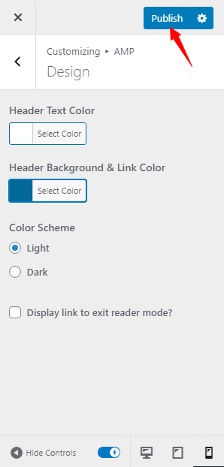
- From the settings you can tweak:
- Text
- Links
- Background color
- Light or dark mode
- Computer, tablet and mobile view
Once you tweak your settings, you can click on Publish at the top of the screen.
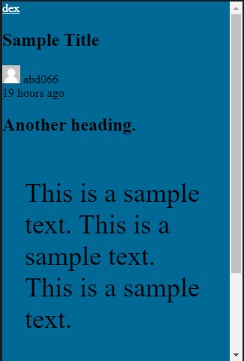
After publishing the page, here is a mobile view of the page:

Neerav Mehta
Founder & CEO
Neerav Mehta is the Founder & CEO of Red Crackle. With sterling qualities, Neerav’s technological acumen is firing a generation of progressive companies on the digital path. With an undergraduate degree in Electrical Engineering from India's most prestigious institution IIT Bombay and having spent seven years developing and contributing to the launch of AMD's innovative line of computer products, Neerav founded Red Crackle where he is lauded for his dynamic and innovative genius.



Let’s get you started!