

<
How to copy a page in WordPress?
Neerav Mehta
Founder & CEO
Why Copy Pages?
You may be faced with a situation where you need to copy an already existing page. Say page A has contents about cars. You require a second page that is similar to A. One solution is that you copy each element, block, and text one by one from page A and paste it into page B. This is time-consuming and can cause errors.
A simpler and more straightforward approach is copying all the contents at once. Let’s see how this is done.
Follow these simple steps to make a duplicate of a page in no time:
- Open your Dashboard, from the left side of your website.
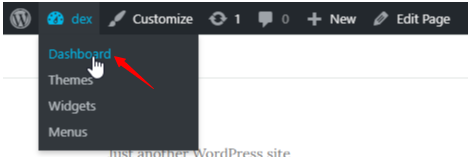
- Now on the left sidebar, hover your cursor over Pages and click on All Pages.

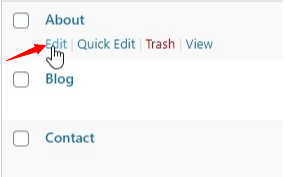
- Now a list of all your pages will appear. Navigate to the page you wish to copy and below its name, you’ll see Edit. Click on it. We are going to copy the About page.
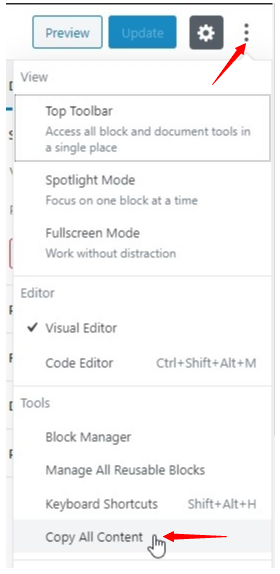
- Now your page will open. On the upper right corner, you’ll see three dots. Click on them and a list will appear. Navigate to the bottom and click on Copy All Content.
- A message appears saying All content copied. Next again navigate to the left sidebar, hover your cursor above Pages and click on Add New.

- You’ll see two blocks. One for the title and one empty. First, enter the title of your page. Next click on the second block, and press Ctrl+V, or right-click and click on Paste.
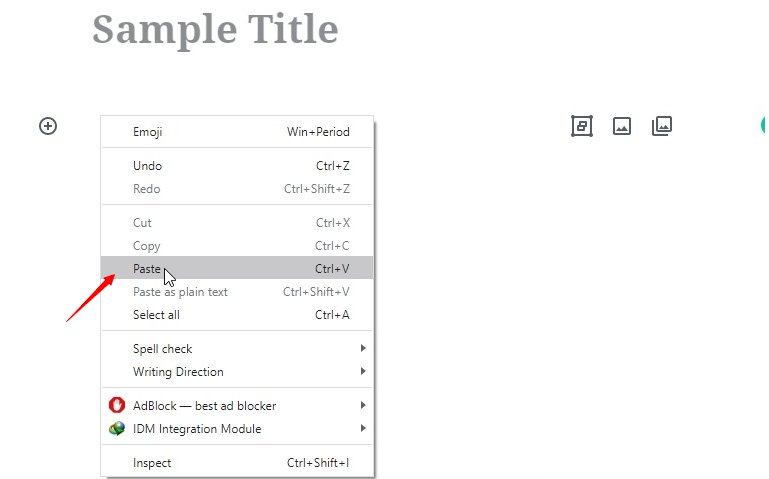
You have successfully copied a page! All the contents will now be pasted on your new page.

Neerav Mehta
Founder & CEO
Neerav Mehta is the Founder & CEO of Red Crackle. With sterling qualities, Neerav’s technological acumen is firing a generation of progressive companies on the digital path. With an undergraduate degree in Electrical Engineering from India's most prestigious institution IIT Bombay and having spent seven years developing and contributing to the launch of AMD's innovative line of computer products, Neerav founded Red Crackle where he is lauded for his dynamic and innovative genius.



Let’s get you started!