

<
How to configure the AMP plugin for WordPress?
Neerav Mehta
Founder & CEO
Not all themes will allow you to edit the footer from settings. Some themes need to be edited through code. Follow these steps to edit a footer through changing code.
On the end of your website you may find text similar to the following. Our aim is to edit it through coding.
- Open the dashboard from the top left on your website.
- From the left menu, hover above Appearance and click on Theme editor.
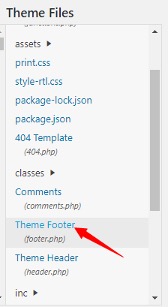
- On the right side, below Theme Files, find and click on Theme Footer.
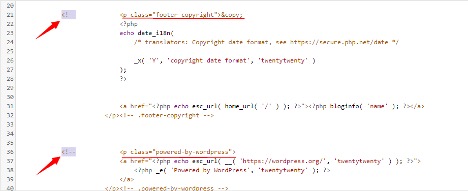
- Now the code file will open. You need to comment the lines that appear in the footer. There are two elements: Copyright 2020 and Powered by WordPress. Find these lines and add <!-- before each of them like shown in the picture below.
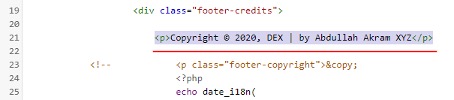
- Add this line of code before the lines you commented out: Copyright © 2020, My Personal website | by Your name XYZ. Edit the data according to your website and your own name.
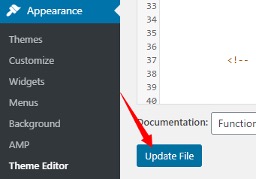
- Finally click on Update File, and you’re all done.
Now verify that you see the updated footer as shown below:


Neerav Mehta
Founder & CEO
Neerav Mehta is the Founder & CEO of Red Crackle. With sterling qualities, Neerav’s technological acumen is firing a generation of progressive companies on the digital path. With an undergraduate degree in Electrical Engineering from India's most prestigious institution IIT Bombay and having spent seven years developing and contributing to the launch of AMD's innovative line of computer products, Neerav founded Red Crackle where he is lauded for his dynamic and innovative genius.



Let’s get you started!