

<
How to install SSL certificate on WordPress website
Neerav Mehta
Founder & CEO
What is SSL, and why do you need it?
The sole purpose of SSL is to provide security to your website. This certificate assures the user that the site they are visiting is secured by encryption. This way, the user does not hesitate to enter their personal information if required.
If you have an eCommerce site, then you definitely need an SSL certificate for your online transactions. The majority of payments service providers like PayPal or Stripe will require you to have an SSL certificate before accepting payments.
Even if you are not an eCommerce site, Google considers an SSL certificate as an important ranking factor when it shows your site to users. In other words, installing an SSL certificate will usually increase your organic traffic without much additional work.
By installing an SSL certificate, your WordPress site's URL schema will convert from HTTP to HTTPS. The "S", in the end, stands for secure.
Prerequisites before setting your website for SSL
The only requirement is that you purchase an SSL certificate. Many hosting sites provide it for free along with the domain name so check with your host before you buy one. In most cases, you can ask your hosting provider to install it for you.
Now you can follow the following simple steps to install the SSL certificate on your WordPress site.
Installation instructions
-
Open the dashboard from the top left on your website.
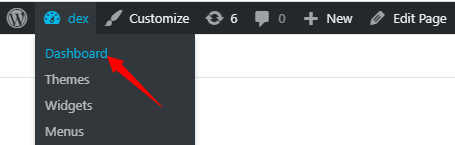
-
On the left side scroll down, hover above Plugins and click on Add New.
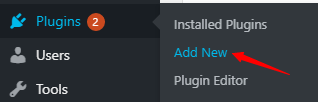
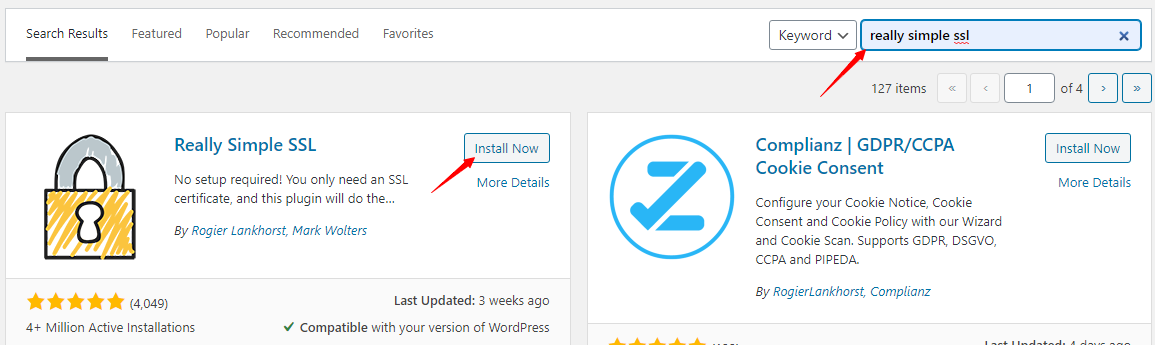
- On the top right, search for Really Simple SSL, and click on Install Now to install it.
- Click on Activate.
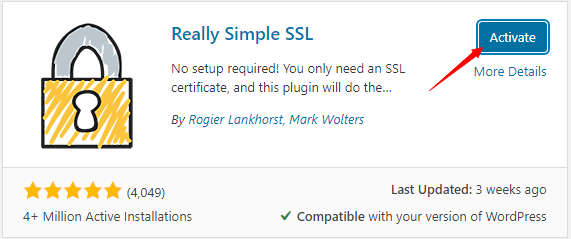
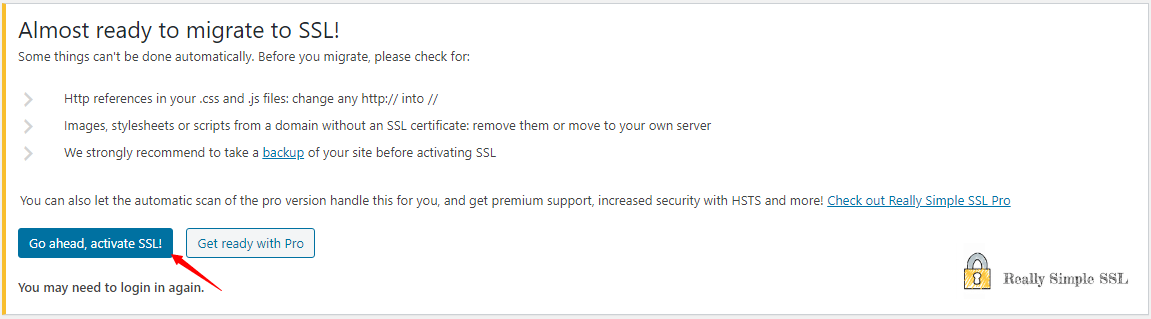
- Next, a message will prompt you to activate SSL. Click on Go ahead, activate SSL!.
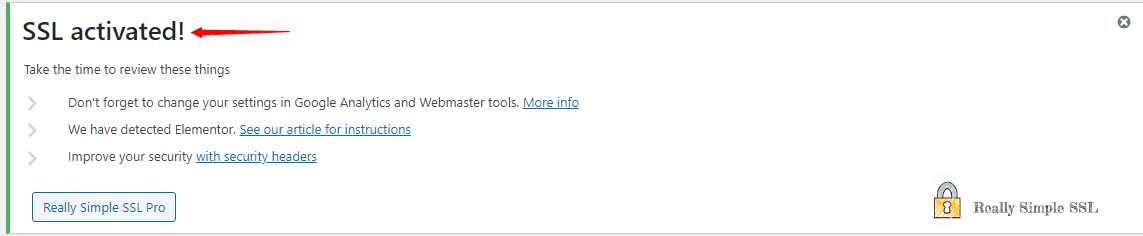
- You’ll receive a message stating that your SSL has been activated successfully.
- You can go to Settings, then click on SSL, for more options. The plugin does the following:
- Sets your WordPress site to use HTTPS in URLs.
- Checks the SSL certificate.
- Looks for URLs in your content still loading from insecure HTTP sources and attempts to fix them.
- Sets up redirects from HTTP to HTTPs.
Verify SSL certificate on your WordPress site
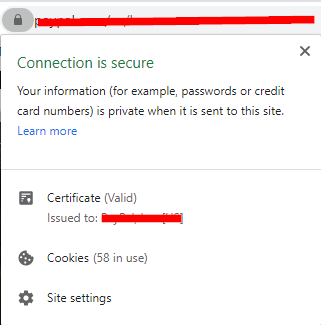
In the browser, besides your URL, check if the lock sign exists. If it doesn't, then the site is still not secure. If it does, then click on it and a popup will appear. It will show whether your WordPress site is secure and has a valid SSL certificate.

Neerav Mehta
Founder & CEO
Neerav Mehta is the Founder & CEO of Red Crackle. With sterling qualities, Neerav’s technological acumen is firing a generation of progressive companies on the digital path. With an undergraduate degree in Electrical Engineering from India's most prestigious institution IIT Bombay and having spent seven years developing and contributing to the launch of AMD's innovative line of computer products, Neerav founded Red Crackle where he is lauded for his dynamic and innovative genius.



Let’s get you started!