

<
How to set homepage in WordPress?
Neerav Mehta
Founder & CEO
The first page that appears before a user when they visit your web site is called a home page. It is an introductory page that houses all the essential information regarding your website. You can change the homepage of your website, meaning the user will land on the selected homepage. It can be anything from the About to Blog to Contact Us. You can also create your sample page and set it as the default Homepage.
How to set the Homepage in WordPress:
Suppose you have created a page named “Test Page”. You wish to set it as your default Homepage, so when users visit your website. They will land on this Test Page.
Consider a second page you created that consists of all the posts, named Sample Page.
Now follow these simple steps:
- Open up your Dashboard, from the left sidebar of your website.
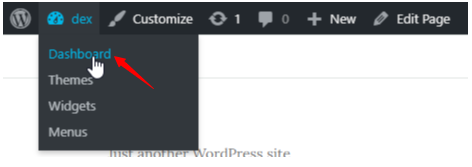
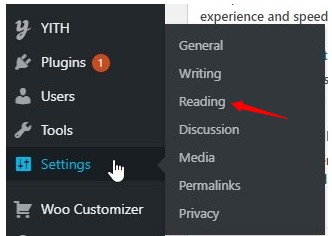
- On the left side, scroll down and hover your cursor over Settings. A menu will appear and then click on Reading.
- Next, you will be redirected to a new page. On the top, you’ll see Your Homepage Displays section. This is automatically selected as Your Latest Posts. Change this by selecting A Static Page.
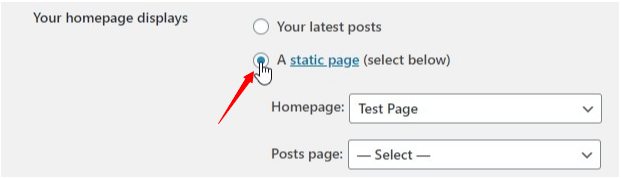
- Next, you’ll see two drop-down lists: Homepage & Posts page. Click on the Homepage dropdown list and select your desired page. We created Test Page so we will select that. Next, click on the Posts Page drop-down list and select your desired posts page. On this page all your posts will appear. We created Sample Page, so we will select that.
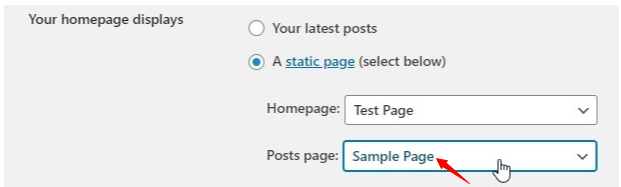 5. Finally, scroll down and click on Save Changes.
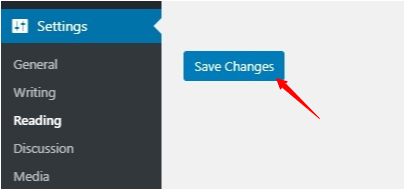
- Setting Saved message will appear, and you have successfully changed your default homepage.
Now whenever a user visits your website, the selected homepage will appear first.

Neerav Mehta
Founder & CEO
Neerav Mehta is the Founder & CEO of Red Crackle. With sterling qualities, Neerav’s technological acumen is firing a generation of progressive companies on the digital path. With an undergraduate degree in Electrical Engineering from India's most prestigious institution IIT Bombay and having spent seven years developing and contributing to the launch of AMD's innovative line of computer products, Neerav founded Red Crackle where he is lauded for his dynamic and innovative genius.



Let’s get you started!